
Changelog
A history of new features, improvements, and fixes in MeDo.
Explore product updates. Product announcements are labeled separately from release entries. Linked guides reflect the current experience.
2026-09-23
Backend resource plans
- On Pro and Max, choose a backend size: Low, Medium, High, or Ultra. Compute changes with the plan, and the new plan is billed from that day. The Free plan cannot switch backend plans.
- On a day the backend is in use, MeDo charges the plan's daily rate. Assigned disk and object storage above the included quota are billed on top. On a day it is not in use, only that overage is charged.
- If credits cannot cover the charge, the backend pauses. MeDo emails you when the balance may not cover about 7 days, and again when about 3 days remain.
Open Backend in the editor to review the current plan and switch it. See Backend settings & keep-alive and Credit System.
2026-09-07
Mobile Trash and payment recovery
- Open Trash from the mobile interface.
- Use a direct payment-recovery action when a subscription payment fails.
- Subscription cards now distinguish a billing-period issue from a failed payment.
Check the subscription state from the account menu when a payment needs attention, then choose the available recovery action.
Self-service payment recovery
When a personal-plan payment is past due, open the overdue invoice from Billing to pay or update the payment method. The recovery action keeps the subscription flow actionable instead of leaving a disabled purchase button.
2026-09-05
Replay and notification fixes
- Fixed lost replay state after an initial generation.
- Improved the placement of the notification indicator.
2026-09-04
Trash and restore
- Find deleted apps in Trash and use the available restore actions.
Open Trash from the project list to review a deleted project’s deletion time and expiry countdown. Restore it when you want to continue working, or permanently delete it after review; deleted projects are retained for 30 days before permanent deletion.
Asset library
Organize files into folders, preview assets, and select personal or official assets to add to chat.
Configure Skills in chat
- Configure supported skills directly in a conversation.
When a conversation needs a user-configured or custom Skill, provide the required API key or complete the OAuth authorization in the clarification card. Submit it to continue the same task, or skip it and configure the Skill later. See the Custom Skills guide for the current workflow.
Publishing errors and feedback
- Improved publishing errors and feedback dialogs.
Review the publishing result in the dialog and use the feedback details to decide what to try next.
2026-08-27
Find the blog from the home page
- Open the MeDo blog directly from the home-page navigation.
2026-08-25
A simpler profile and billing menu
- Manage profile settings, credits, and billing from a more compact account menu.
- Choose a billing cycle in an improved personal-plan purchase flow.
- Fixed mobile subscription-confirmation dialogs appearing behind another panel.
2026-08-18
Clearer credit rules
- Read clearer credit-earning rules and eligibility information.
- Removed domestic-only reward descriptions from the overseas rules page.
2026-08-17
Android App Bundle export
- Export Android builds as an AAB, alongside APK packaging.
For a new Google Play listing, open the Android packaging panel, select AAB, build the version, and download the completed artifact. MeDo continues to provide APK builds for direct installation and compatible distribution workflows. See the Google Play publishing guide for the release path and verification checklist.
2026-08-11
Faster access to skills
- Open skills directly from the home-page toolbar.
Open the Skills list from the toolbar below the chat box, or type @ in the conversation. The list includes official and custom Skills, so you can select a capability before describing the task. See the Skills guide for the available entry points and the Used Skills list.
2026-08-06
Subscription change confirmations
- See clearer subscription-change confirmations, including taxes and scheduled changes.
Review the plan, tax, and scheduled-change details before confirming a subscription update.
Scheduled subscription changes
- Review and cancel scheduled changes to a personal subscription.
Open your personal subscription details to review a scheduled change and cancel it when needed.
Project migration
- Expanded project migration to support moving projects from enterprise spaces to a personal space with the required permissions.
Use the migration flow when you need to move an eligible project from an enterprise space into a personal space.
App analytics in the editor
Review access statistics for a published app directly in the editor.
2026-07-29
Home page and onboarding
- Explore a refreshed home page and new-user onboarding.
Start from the refreshed home page and follow the onboarding guidance to choose what to build next.
Recommended apps
- Discover recommended apps while a build is running.
Browse recommended apps while your app is being built for ideas and examples.
Enterprise management
- Improved the enterprise-management interface.
Use the updated enterprise controls to manage projects and workspace settings.
2026-07-23
Interface and payment fixes
- Fixed several interface and payment-flow issues in the overseas workspace.
2026-07-22
Shared backends
- Connect multiple apps to a shared backend.
Multiple Website, App, and admin projects can reuse the same database, storage, authentication, and Edge Functions while keeping their frontends and channel settings separate. To create another channel, open Project → Create project, choose the app type, select an existing project as the shared backend, confirm it, and generate the new app. Switch between connected app projects from the editor when you need to work on a specific channel. The Shared Backend guide covers the connected-app group and editor project switcher.
Separate development and production environments
- Use separate development and production environments.
Keep development and production databases separate while building and testing, then manage the two environments from the backend overview. Check a change in development first, and apply it to production when it is ready.
SEO Agent
- Review and improve an app’s search settings with SEO Agent.
For a web app, open the Publish panel and choose Search Engine Optimization. In SEO view, preview the whole site or a single page, review the suggestions for the title, meta description, and meta keywords, then apply a fix or use one-click repair where available. Review the updated page settings before continuing with the publishing flow.
General Task replay
Replay a recommended task’s execution and follow its progress as the task runs. Continue the conversation when it completes.
iOS packaging
- Package iOS apps for distribution.
Choose the route that matches the audience: local device testing, Ad Hoc, TestFlight, or App Store distribution. Select the corresponding option in the packaging flow, then follow the iOS Publishing Guide for signing, device registration, beta testing, and App Store submission.
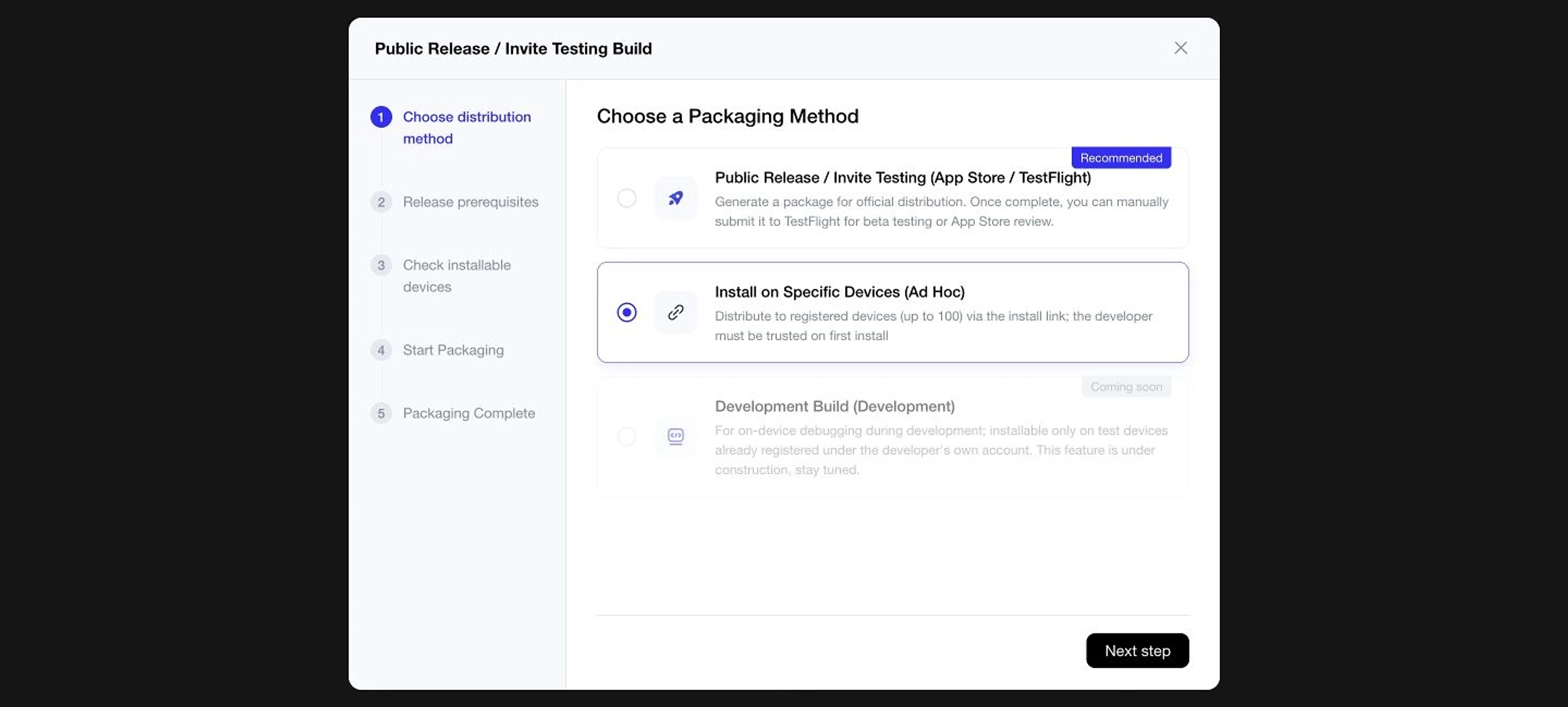
Distribution options in the current iOS packaging guide.
Reference files and selected code
- Reference project files in your conversation.
Select a file or code fragment when you need a targeted change, describe the edit you want, and continue refining the app from the resulting build context. The selected context stays connected to the instruction you send.
2026-07-16
Mini-program publishing re-enabled
- Mini-program publishing is available again.
2026-07-10
Overseas WeChat mini-program publishing
- Create and publish overseas WeChat mini-programs from MeDo.
Choose the Mini Program output when you want to take an app through the overseas WeChat publishing flow. Follow the publishing steps from the app’s release controls.
Invitation and billing resources
- Improved loading for invitation and billing resources.
Continue through invitation and billing steps with the updated resource loading experience. The related resources are ready as you move through the publishing flow.
Trusted domains and submission feedback
Before release, add the app’s Supabase domains to WeChat’s allowed request-domain list and submit the Mini Program for review. Trial builds may require Development Debugging; released users do not. See the Mini Program trusted-domain guide and its submission-failure fixes.
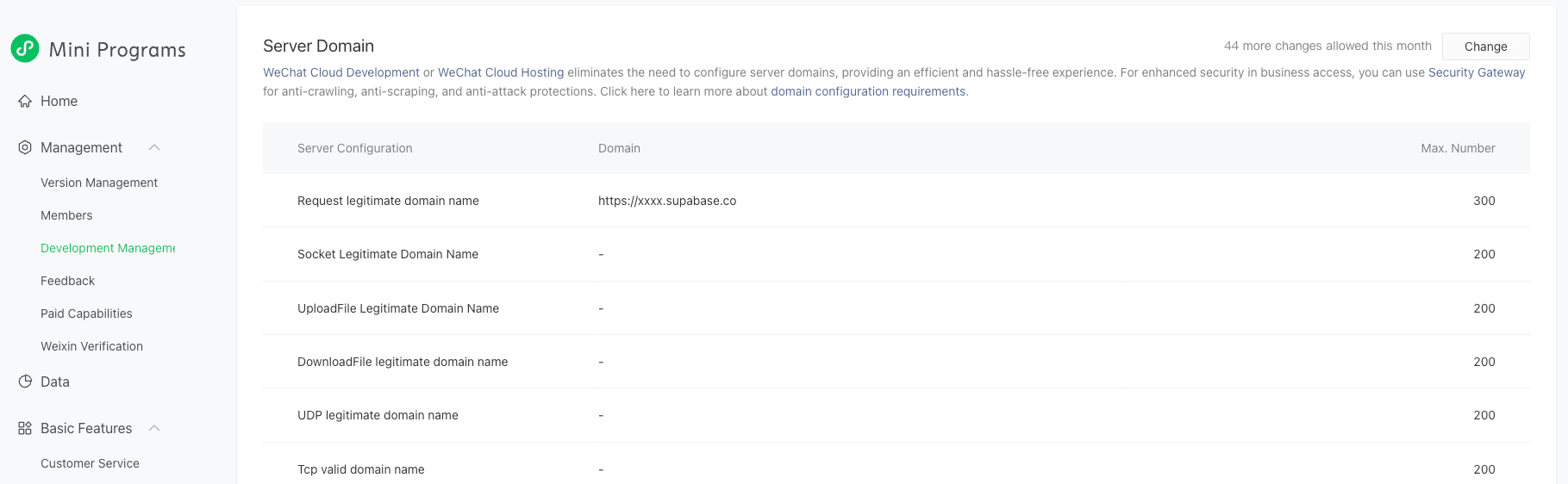
Trusted-domain settings in the current WeChat Mini Program guide.
2026-06-29
Custom Skill management
- Configure and manage custom skills through an updated interface.
Open Skills → My Skills → Create Skill, upload a .zip package or SKILL.md, review the generated definition and configuration, and create the Skill. See the Custom Skills guide.
Use and manage Skills
Invoke a Skill with @ in chat, check it in Used Skills, and manage it later in My Skills. Return to My Skills when you want to review the Skill you have configured.
Deep Research improvements
Improve research tasks and report workflows with Deep Research. See the General Tasks guide.
Light or dark themes and project transfer
- Switch between light and dark themes.
- Use the new project-transfer controls.
- Follow clearer requirement-clarification steps and collapse older build progress.
2026-06-24
Seven-day trial sign-ups closed
- The seven-day trial is no longer accepting new sign-ups.
2026-06-12
Profile sharing
- Share a personal profile and the apps you create.
Open your personal profile to share your profile and the apps you have created.
Workspace navigation
- Navigate an improved sidebar and updated watermark controls.
Use the updated sidebar to move through your workspace and manage the watermark controls available for your apps.
Data analysis tasks
- Use an improved entry into data-analysis tasks.
Upload an Excel, CSV, or another supported file, ask MeDo to analyze it, and continue from the generated charts, summaries, or conclusions. You can continue working from the generated result or share the task output. See General Tasks.
2026-06-05
Preview generated presentations
- Preview generated presentations inside MeDo.
After a presentation is generated, preview it from the task result. Use the page controls to review each slide, and if a page fails to render, use the page refresh action or the refresh control in the upper-right corner. See General Tasks.
Credit guidance
- Get clearer guidance when a conversation runs low on credits.
Review the credit guidance in the conversation when you need to decide how to continue a task. Use the guidance before sending the next request.
2026-06-04
Seven-day trial introduced
- Introduced a seven-day trial and updated credit rules.
- Historical offer: new sign-ups for this trial ended on June 24, 2026.
2026-05-29
Traditional Chinese interface
- Use the Hong Kong Traditional Chinese interface.
Choose Hong Kong Traditional Chinese from the language options to use the localized interface. Navigation and labels then appear in the selected language across the main MeDo experience.
Mobile app projects
- Start a mobile app project from the home page.
Choose a mobile app project from the home page, then describe the app you want to build in the conversation. Continue from the generated mobile project as you refine its screens and behavior.
2026-05-15
General Tasks workspace
Track task progress, preview and download generated files, then continue working from the result.
Skill package upload and use
Upload a .zip package or SKILL.md, preview its definition, and use the Skill in conversations.
2026-04-30
AI Quality Analysis
- Run AI-assisted quality checks on web apps before publishing.
Run an analysis after generating a version, inspect the report, continue with natural-language changes, and use Try to Fix when the report identifies an issue. The AI Quality Analysis guide lists scenarios that still require manual verification.
A clearer publish flow
- Use an improved publishing flow and clearer recommendation replays.
Publish from chat or the Publish button, wait while the publishing operation is locked, then share the Published application through its available channels. See the App Release guide.
Easier template discovery
- Identify templates more easily in the desktop marketplace.
Browse the marketplace with clearer template labels when you are looking for a starting point. Open a template to compare it with the app you want to build.
2026-04-02
Plan benefits
- Updated personal-plan benefits and free usage quotas for supported integrations.
Review the benefits available to your personal plan as you choose how to build and use an app. Use the plan information to understand which supported features are available to you.
Contextual suggestions
- Get contextual suggestions while editing an app.
Use suggestions shown during editing to choose a relevant next action for the current app. Select a suggestion when it matches the change you want to make.
Integration quotas
- Improved file-upload and integration-panel behavior.
Open the integration panel to review supported connections and continue after uploading the files needed for your task. Keep the connection and file steps together while you work on the app.
2026-04-01
Product announcement: OpenClaw × MeDo Skill
Use natural-language conversations in OpenClaw to create, view, iterate on, and publish MeDo apps. See the MeDo Skill guide and the official announcement.
Product announcement: MeDo UI Enhancer
Choose from 17 visual styles and use them to guide designs such as editorial pages, dashboards, or bold visual interfaces. Read the official UI Enhancer article.
2026-03-27
MeDo in Japanese
- Use MeDo in Japanese.
Select Japanese when you want to use the MeDo interface in Japanese. Continue building and managing apps with the localized controls.
Localized home page
- Explore an updated home page with improved localized text and system notices.
Find localized guidance and system notices on the updated home page.
2026-03-24
More reliable file uploads and messages
- Upload multiple files that share the same name.
- Fixed a message-sending issue that could omit part of a request.
2026-03-12
System messages work better in Safari
- Fixed an issue that prevented system messages from expanding in Safari.
2026-03-06
Edge Functions
- Access the Edge Functions panel for your app’s backend.
Edge Functions are server-side functions associated with the app backend. The dedicated panel gives you a place to work with this backend logic alongside the app’s data and services. See the Backend guide for managing the app’s backend.
Image files in the code editor
- View image files in the code editor.
Open image files from the project file view to inspect them alongside the rest of your source. Keep visual assets available while you review related code.
Input validation
- Get clearer requirements-length validation and more reliable message-input clearing.
Review the requirement length as you describe a change, then continue with a cleared input when a message has been sent. The input state is ready for the next instruction after submission.
2026-02-13
Profile personalization
- Update your nickname and avatar.
Open profile settings to update the name and avatar shown across your MeDo account.
Mobile credit purchases
- Purchase additional credits from your mobile browser.
Open the credit purchase flow in a mobile browser when you need additional credits for continued work.
Refresh an app preview
- Refresh an app preview from the development workspace.
Preview after edits, switch between PC and mobile modes where supported, and check the published version from My Applications → Already Live. Refresh the development preview when you want to review the latest changes before publishing. See the App Preview guide.
2026-02-09
Fixed duplicate mobile app creation
- Fixed a mobile creation issue that could create duplicate apps and consume credits twice.
2026-02-06
Fast and Deep modes, clearer conversations
- Choose Fast or Deep mode from the chat input.
Choose the mode from the chat input before sending a request. Keep the mode choice with the request as you move from the first instruction to the next change.
A clearer build conversation
- Read a less cluttered view of the build conversation.
Follow the build conversation with less visual clutter as requirements, progress and results appear. Return to earlier messages when you need to understand a change.
Custom plugins
- Set up custom plugins through an improved configuration flow.
Open the plugin configuration flow to connect a custom plugin and use it from the app workflow.
AI-generated-content labels
- Updated the presentation of AI-generated-content labels.
Identify AI-generated content more easily as you review the conversation and resulting app material.
2026-01-23
Credit activity
- Review how you earn and spend credits.
Open credit activity to review how credits are earned and spent. Use the history to understand the activity associated with your MeDo work.
Backend controls
- Pause and resume an app’s backend from its management controls.
Use the app management controls to pause backend services while you work on the project, then resume them when you are ready. The same controls let you check the backend state before continuing.
2026-01-14
Bring Markdown requirements into a build
- Upload a Markdown file when describing the app you want to build.
Use the file upload control below the homepage conversation box, attach the requirements document, and describe the application type and requested result. MeDo uses the uploaded requirements as context for the initial build. The Create a Site guide also covers creating an app from an uploaded requirements file.
2025-12-31
Reset the conversation context
- Start with a fresh conversation context when you want to reset the instructions for your next changes.
2025-12-26
Project lists and onboarding
- Work with refreshed project lists and an updated new-user guide.
Open your project list to find existing work and follow the updated guidance when you are getting started. The refreshed list keeps your projects close to the next action you want to take.
App secrets
- Manage app secrets from a dedicated panel.
Open the secrets panel from app management when a project needs private configuration values. Review or update those values without leaving the project management flow.
Try to Fix
- Try to fix now handles additional network-error scenarios.
When a supported network error is identified, use Try to Fix from the conversation flow to continue working on the app. Follow the repair result in the conversation and return to the requested change when it is ready.
2025-12-18
Explore an app before copying it
- View an app’s build history separately from copying it.
- Improved app-cover handling in the marketplace.
2025-12-02
More reliable typing and screenshots
- Fixed unexpected cursor jumps while typing.
- Corrected screenshot alignment in Safari and Firefox.
2025-11-28
Copy an app
- Create a copy of your own app.
Choose an existing app from your projects when you want to continue from an existing starting point. Use the copy as a separate project while the original remains available.
Edit with screenshots
- Add screenshots to a conversation to explain the changes you want.
- Use the new invitation-code flow, with improved screenshot annotations in Safari.
Take a screenshot of the area you want to change, annotate the target, upload it to the chat, and add a short instruction such as “adjust the button style.” The Screenshot-Based Editing guide shows the same capture, annotation, upload, and request flow. Use the annotated image to keep the requested area clear while you refine the app.
2025-11-20
Copy apps with a backend
- Duplicate apps that use a backend to start building from an existing project.
Choose an existing backend-enabled app when you want to use it as your starting point. Continue from the copied project’s available app and backend context.
2025-11-14
Privacy information on the home page
- Find the privacy policy directly from the MeDo home page.
2025-11-13
MeDo launches globally
- Build and publish full-stack apps with natural-language instructions. MeDo is now available globally at medo.dev.