
Credit System
What costs credits on MeDo, how many, how you earn free credits, what the paid plans include, and the rules for expiry, upgrades, and refunds.
Everything you do on MeDo is paid for in credits. This page lists what costs credits, how you get them, and the rules that apply. The numbers below match the Credit rules tab on the Plans & Billing page in the app, which is the authoritative source if the two ever differ.
What costs credits
Building
Deep Build and Fast Build sit in the + menu on the prompt bar. Deep Build is the default; it does more work per message and costs four times as much. See Using build modes.
A message is only charged when it completes. If generation or a conversation attempt fails, the credits for that attempt are returned.
Publishing and running
On a day the backend is not in use, MeDo charges only disk and object-storage overage, not the plan rate. How disk grows from 2 GB to 8 GB, then by 50%, is in Backend settings & keep-alive. The Free plan cannot switch backend plans. Backend keep-alive is what stops a Free-plan backend going offline after five inactive days; see Backend settings & keep-alive. If credits cannot cover a charge, the backend pauses until you add credits. MeDo emails you when the balance may not cover about 7 days, and again at about 3 days.
Copying, exporting, and packaging
Which credits are spent first
- Free credits are used before paid or subscription credits.
- Within the same pool, the batch closest to expiry is used first.
How you earn free credits
Monthly caps reset on the 1st of each calendar month. Apart from the Free-plan daily login bonus, free credits are valid for 15 days.
Paid plans
Subscription credits are granted monthly on both monthly and annual plans. Prices are shown on the Plans & Billing page; annual billing saves 17%.
What the paid plans unlock
Beyond more credits, Pro and Max turn on features that the Free plan does not have:
- Remove the in-app watermark and the project watermark
- Connect a custom domain, and use a custom prefix on the published link
- SEO checks with AI fix suggestions
- Download the source code
- Share a backend between apps, and use separate development and production backend environments
- Backend keep-alive (Free-plan backends pause after 5 days of project inactivity)
- 1 GB asset library storage and 500 MB per uploaded file (Free: 100 MB and 50 MB)
Max adds priority access to beta features and priority support. See Subscription & Billing for how to change plans.
Credit packs
If you run low mid-month, buy a credit pack. Packs are a one-time purchase, not a subscription, and can be bought as often as you like. Pack credits are valid for 365 days.
Rules worth knowing
- Left-over subscription credits roll into the next billing cycle as carry-over credits and expire one month later.
- Upgrading mid-cycle charges the prorated price difference for the remaining days and grants the prorated extra credits immediately.
- Downgrading takes effect at the start of the next billing cycle. Credits already granted keep their original expiry.
- Failed attempts restore credits. If app generation or a conversation attempt fails, the credits charged for that attempt are returned. That is a usage adjustment, not a refund of fees.
- Subscription credits and purchased credits are non-refundable, non-cashable, and non-transferable, except where required by applicable law. See Terms of Service. If you see an unexpected or duplicate charge, write to admin@medo.dev.
Where to check your balance
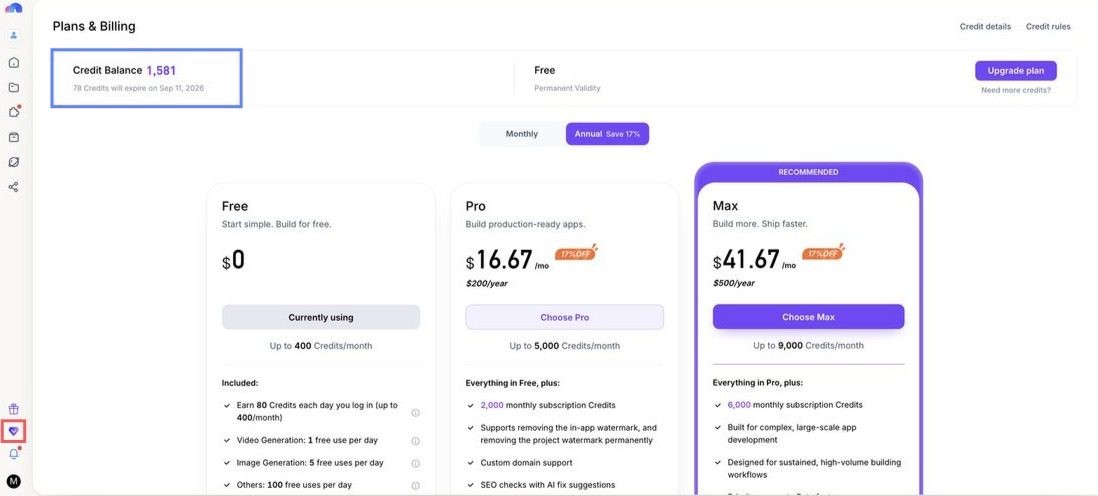
Click your credit balance in the sidebar (or the balance in the editor's top bar) to open Plans & Billing. The Credit details tab lists every grant and charge with its expiry date; the Credit rules tab is the live version of the tables on this page.
Quick examples
- You have 100 free credits and 2,000 subscription credits. Five Fast Build messages (5 × 10 = 50) take the free balance to 50 and leave the subscription credits untouched.
- You have two free-credit batches expiring on different days. MeDo spends the one expiring sooner first.
- On the Free plan, today's login bonus expires tomorrow night, so use it the day you get it.