
App Analytics
See how your published app is used: page views, visitors, and dwell time in the data analysis view, and how to read them.
Once an app is published, MeDo records who opens it and for how long. The numbers live in the editor, so you can check them while you decide what to change next.
Open the data analysis view
- Open the app in the editor.
- Click the data analysis icon in the left rail (the bar-chart icon).
The app must be published first — before that there is nothing to count, and the view asks you to publish. See Publishing a release.
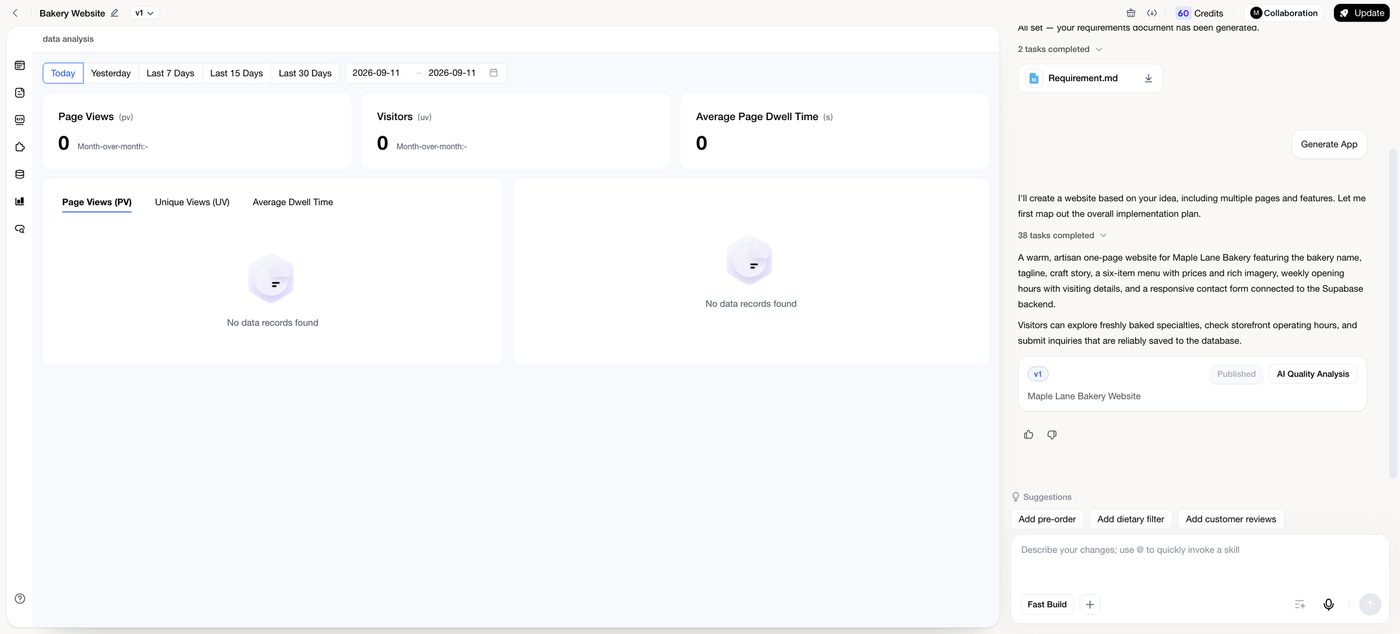
What you see
Three headline cards, each with a month-over-month comparison:
Below the cards, tabs switch the chart between Page Views, Unique Views, and Average Dwell Time over the selected period, with a second chart breaking the traffic down.
Choose a period
Use the buttons at the top — Today, Yesterday, Last 7 Days, Last 15 Days, Last 30 Days — or pick a custom date range. Data for today accumulates through the day, so compare complete days when you want a fair comparison.
Reading the numbers
- Many views, few visitors means people are exploring several pages each — usually good. Views close to visitors means most people leave after one page; check what the first page asks of them.
- Short dwell time on a content page suggests the page does not deliver what the link promised. Long dwell time on a form page can mean the form is confusing.
- Compare the week before and after a release to see whether a change helped. Publish, wait a few days, then compare Last 7 Days with the previous week.
- A sudden drop to zero usually means the app is offline or its backend is paused, not that visitors vanished. See Backend settings & keep-alive.
Submissions and records
Analytics counts visits, not form submissions. To see what visitors actually saved — bookings, enquiries, orders — open the Backend view and the Table editor, or your app's own admin page. See App data & forms.
Related
- SEO & Search Visibility — bring more visitors in from search.
- Marketplace — another source of traffic.