
App Secrets
Store API keys and other private values in the Secrets panel of your app backend so server-side functions can use them without exposing them to visitors.
A secret is a private value — an API key, a token, a password — that your app's server-side code needs but visitors must never see. Secrets live in the backend and are only readable by your Backend Functions; nothing in the pages can reach them.
Add a secret
- Open the app in the editor and click the Backend icon in the left rail.
- Switch to the environment tab and choose Secrets.
- Under Add new secrets, enter a Name (for example
RESEND_API_KEY) and its Value. Click Add another for more, then Save.
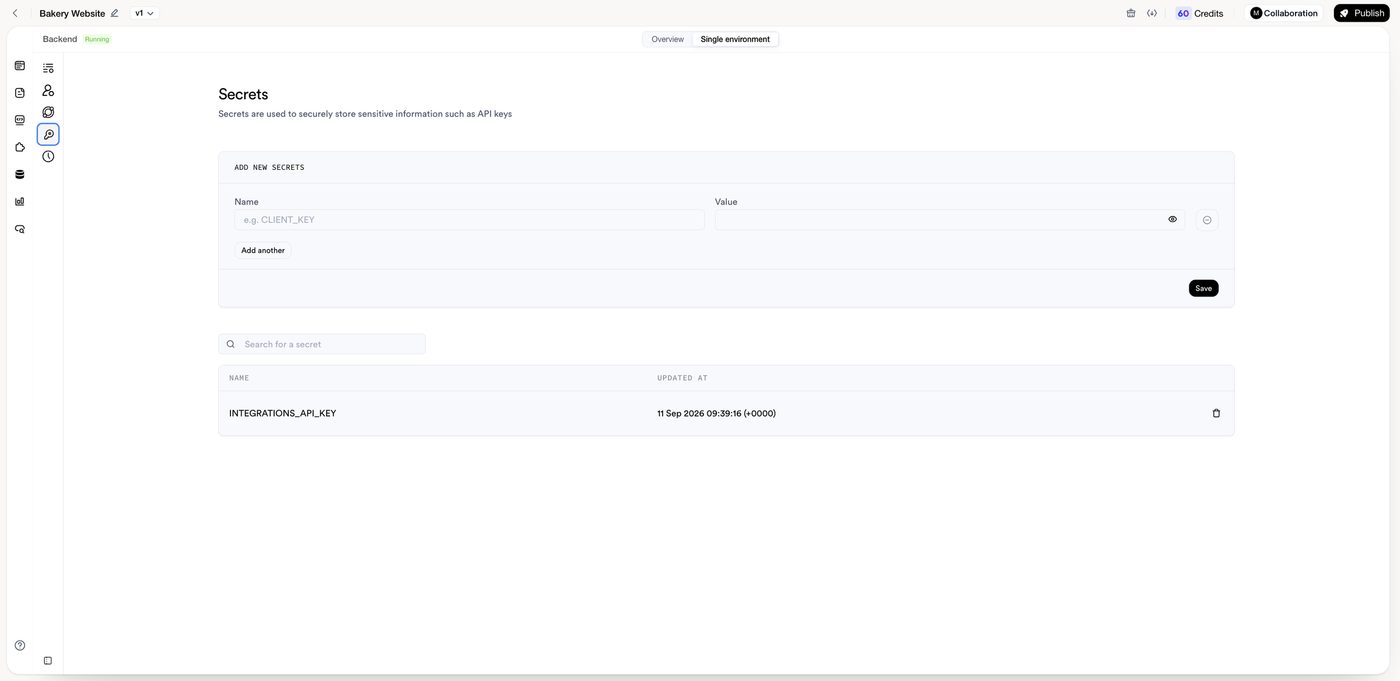
Use the search box to find a secret later. You will also see an INTEGRATIONS_API_KEY entry that MeDo created; leave it in place — Skills and integrations depend on it.
Once the secret is saved, tell MeDo about it in the conversation: "Use the RESEND_API_KEY secret to send the confirmation email." MeDo writes the function so that it reads the value by name at run time; the key itself never appears in the code.
Update or rotate a secret
Open the same panel, change the value, and save. Then ask MeDo to redeploy the function that uses it, or make any change to that function in chat — a deployed function keeps the value it started with until it is redeployed. If a key may have leaked, generate a new one with the provider first, then update the secret.
What belongs here
- Third-party API keys and tokens (payment providers, email, maps, AI services).
- Passwords or credentials for external systems your functions talk to.
What does not
- Values that are meant to be public — a publishable key used in the browser, a public map style ID — belong in the frontend, not in Secrets.
- Never paste a secret into a page, a prompt you publish, or the app's content. If you have already done that, rotate the key.