
Marketplace
What the Marketplace is, how to remix an app from it, and how to list your own published app so others can find it — and earn credits when they remix or like it.
The Marketplace is the public gallery of apps built on MeDo. It sits below the prompt box on the home page. Every listing is a real, running app: you can open it, click through it, read the conversation that built it, and — if the owner allows — remix it into a project of your own. Listing your own app there is optional, reversible, and earns you credits when people engage with it.
Use an app from the Marketplace
- Browse by category (Education, Website, Marketing, Productivity, E-commerce, Tools, Games, Survey, Research, Others) or search by name.
- Visit opens the live app; Details shows the listing page with the build conversation and a like button.
- Remix copies the app into your own Project list as a full project — pages, conversation, and data model. Remixing costs 30 credits and you can edit the copy freely. Rename it from the pencil next to the name in the editor.
If you want a starting point rather than a blank prompt, this is usually the fastest one.
List your own app
Only published apps can be listed; publish first (see Publishing a release). Then:
- In the editor, click Update at the top right to open the publish panel and choose Marketplace.
- Fill in the listing form:
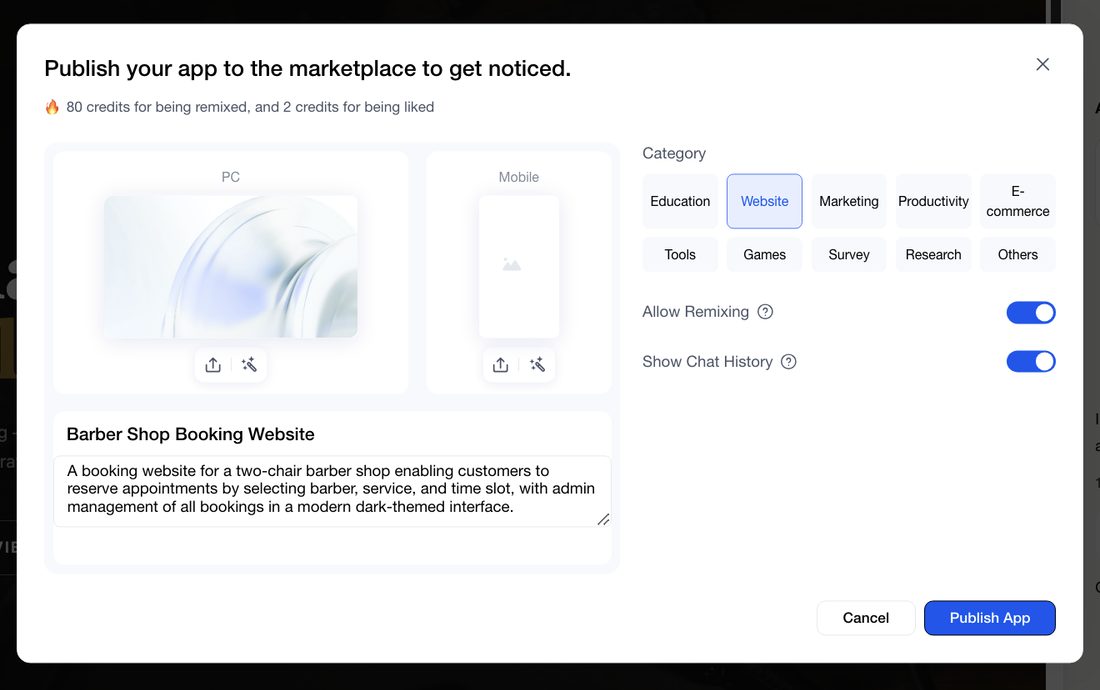
- Cover images for PC and Mobile. MeDo captures them from your app; use the icons under each one to upload your own or regenerate.
- Title (up to 99 characters) and description — what people see on the card and the listing page. Rewrite the generated text so it reads well.
- Category — pick one. This is the filter people browse with.
- Allow Remixing — when on, anyone can copy your app, and you earn 80 credits each time they do (up to 400 a month). Turn it off if the app should be seen but not copied.
- Show Chat History — reveals the conversation that built the app. It doubles what a like earns you (2 credits instead of 1, capped at 200 or 100 a month). Hide it if the conversation mentions anything private.
- Click Publish App.
Before you list, make sure the app has real content rather than placeholders, no test records or client data, no credentials in the pages or the conversation, and that it works on a phone — most people browsing will be on one. A listing that breaks the content policy can be suspended; see Keys & data safety.
To unlist, open the publish panel, choose Marketplace again, and remove the listing. The app stays published and reachable by link; only the public listing goes away.
Related
- Credit System — what remixes and likes earn you.
- App Analytics — see whether the listing brings traffic.
- What You Can Build — curated examples by role.