
Testing with AI Quality Analysis
Run an automated test over your app before publishing, read the report, and use the free repair attempt.
Before you publish, let MeDo test the app for you. A test agent opens your app, works through it like a visitor, and reports what is broken. Run this after your own preview pass and before publishing.
What it checks
The agent follows your requirements document and exercises the app end to end:
- Navigation and routing — every page opens and links go where they should.
- Interactions — clicking buttons, filling and submitting forms, choosing options.
- Data round-trips — a record you create is saved and reads back correctly.
- Backend responses — failed requests and timeouts.
- Console errors — JavaScript errors that a visitor would hit silently.
- Content accuracy against the requirements — the pages and fields you asked for actually exist.
What it does not check
Be clear about the boundary, because it is easy to assume more coverage than you get:
- It is not a security check. It does not attempt unauthorized access, look for exposed data, or scan for vulnerabilities. What you should verify yourself is in Keys & data safety.
- Multi-role rules are not verified. The agent signs in as one user, so restrictions like "staff can see this, customers cannot" have to be tested by hand. See Managing access & roles.
- Real-world flows are skipped, including payments, SMS or email verification, camera, microphone, and anything needing a specific uploaded file.
- Long-running generation — images, video, slide decks — is not waited on.
- Game apps are not supported.
Anything in this list is also excluded from the free repair attempt, and excluded from the score in the report.
Run it
- On the version card in the editor, click AI Quality Analysis.
- Wait. A run takes roughly 10 to 20 minutes depending on how much there is to test — you can leave the page and come back.
- Read the report when it finishes.
Each run costs 60 credits. If you stop a run, the credits are returned. See Credit System.
Read the report and fix
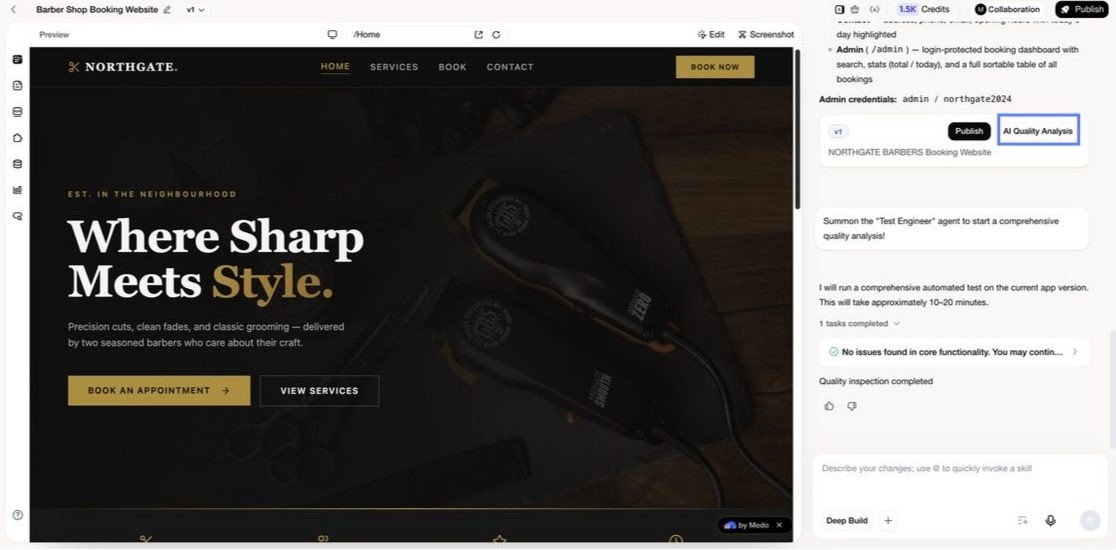
The report ends in one of two ways:
- No issues found in core functionality — proceed to publish.
- Issues found — the report lists what failed and where.
When issues are found you get one free repair attempt: click Try to Fix and MeDo edits the app itself. You can also just describe the fix in the conversation instead, which is often better when you know exactly what is wrong.
A single repair attempt does not always clear everything. After it finishes, run the analysis again to confirm, and fix anything remaining through the conversation.
Test the rest yourself
The automated run plus these manual checks is a realistic pre-launch pass:
- Sign in as a second user and confirm they cannot see the first user's records.
- Complete one real payment in test mode if your app takes money.
- Open the app on a phone, not just a desktop browser.
- Submit a form and confirm it appears in the admin view.