
Subscription & Billing
Free, Pro, and Max compared, what each unlocks, how to upgrade, buy credit packs, cancel, and find invoices.
This page is about what you pay MeDo. Payments your own apps take from their customers are a separate topic — see Stripe and PayPal.
Open Plans & Billing
Click your credit balance in the sidebar, or open the account menu and choose Plans & Billing. The page has the plan comparison, credit packs, your Orders, and the full Credit rules.
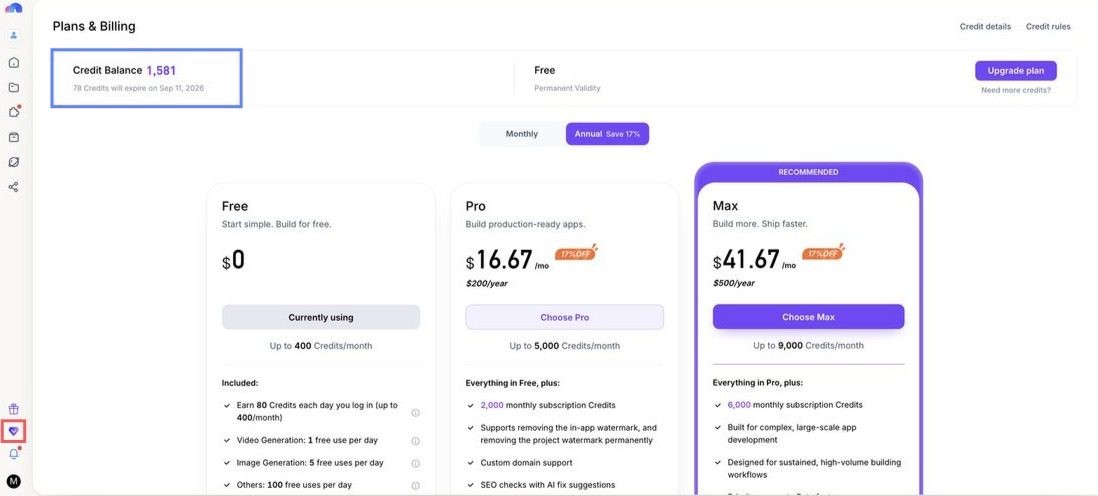
The plans
Subscription credits arrive monthly on both billing cycles; paying yearly saves about 17%. What credits buy is in Credit System.
What Pro unlocks
Pro is the plan for anything you show to other people:
- Remove the "by Medo" watermark from your apps and projects
- Custom domain, and a custom prefix on the default address
- SEO checks with AI fixes
- Download the source code
- Share a backend between apps, and run separate development and production backend environments
- Backend keep-alive, so a backend never pauses for inactivity (Free backends pause after 5 idle days)
- 1 GB asset library and 500 MB per file (Free: 100 MB and 50 MB)
What Max adds
Everything in Pro, three times the credits, priority access to beta features, and priority support. Choose Max if you build every day or generate a lot of video and images.
Enterprise
Teams buy seats on the Enterprise plan — $39.90 / month for 2 seats, then $19.95 per seat — which adds team workspaces, collaboration, SLA, and a shared 10 GB asset library. See Enterprise & Teams.
Upgrade
- Open Plans & Billing and click Upgrade on the plan you want.
- Choose monthly or yearly.
- Pay by card through Stripe.
The new plan is active as soon as the payment goes through, and the first month's credits are added straight away.
Buy a credit pack
If you run out before the month does, buy a credit pack from the same page. Packs are a one-time purchase, from $20 for 2,000 credits up to $2,000 for 260,000, and the credits are valid for 365 days. The full table is in Credit System.
Change or cancel
- Upgrade Pro → Max: buy the new plan; the change is immediate.
- Cancel: open Plans & Billing → Orders, find the subscription, and manage it in the Stripe portal that opens. Your plan stays active until the end of the period you already paid for; credits you were granted keep their expiry date.
- Subscriptions are not refundable except where required by applicable law. See Terms of Service. If you believe a charge is a mistake, write to
admin@medo.devwith the order details.
Invoices and receipts
Every payment has a Stripe-hosted invoice. Open Plans & Billing → Orders and click the order to view or download it. Tax is calculated by Stripe and shown on the invoice.
When a payment fails
If a renewal fails, update your card in the Stripe portal (Orders → the subscription) so the payment can be retried. Fix it promptly — the next month's credits are only granted once the renewal succeeds.
Common questions
- Do unused subscription credits roll over? They keep their expiry date, which is set when they are granted; see the expiry rules in Credit System.
- Can I pay yearly and still get credits monthly? Yes — credits are always granted monthly.
- I upgraded but a Pro feature is still locked. Reload the page. If it is still locked after a minute, contact
admin@medo.devwith your order number.